
What is Ping Jitter
You may have seen the term ping jitter while doing an internet speed test. Ping Jitter is is a measure of how much latency varies over a period of time. Lower jitter is advantageous because it means your ping times are more consistent, and therefore your connection are more stable. A low ping time is always preferred because it takes less time to for packets to reach and return from the server. In everyday networking, a low pings will significantly help VOIP and online gaming performance.
One way to reduce a high ping on a DSL connection is to contact the ISP’s technical support team and ask to have interleaving turned off on the line. If the DSL modem can maintain a strong connection without this error-correcting technology in place, roundtrip ping can be reduced by about 30ms.
Ping jitter can be decreased by removing any interference which may be causing an unstable internet connection. Check the wiring in your more of office to minimize direct interference (eg. don’t have power cables near coaxial cables, make sure to minimize splitters on the line and use high-quality cables, etc). On wireless connections it’s important to make sure you’re on an uncongested wireless channel. Using 5GHz instead of the saturated 2.4GHz can also help stabilize a connection.
Running a traceroute (using tracert in command prompt on Windows or within Network Utilities on OS X) can show if a connection is unstable between the networking equipment that you own or if the network trouble is on your ISP’s end.

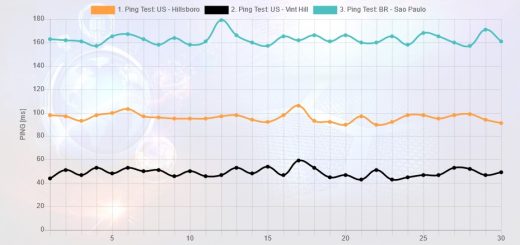
Hi! I have a strange case. My missus and I have idenical PCs. Her ping is 60 with 1ms jitter. Mine is 85 with 20ms jitter, on the same connection. Performed LSPfix, reinstalled network stuff, removed unused protocols etc. Any ideas?
If you're both in the same home, connecting to the same ISP through a router, then are both of you either wired to the router or wireless connected?
I would recommend doing some more tests. You probably just tested during a bad time. Your 85 – 20ms (jitter) is 65 which is close to the 60ms. It could have been a temporary high server load or ISP load or something. What are your results today?
Hi Techie! Thanks for the reply. I've run tracert myrouter.home on both pcs. On hers its a constant <1ms, whereas mine varies between <1-30ms with the occasional 150ms-1000ms spike. We are both running wireless.
The most curious property is that, if we both tracert, say, easynet.net, my pings right throughout the trace are 70-80 ms ( with occasional 150ms spikes) where hers are consistant 50-60ms.
I consisdered a QoS problem but we both have qos uninstalled. I have tried tracert during a large DL from microsoft site and the loading makes no difference on my pc (suggesting a permanent load?)
During a pingtest.net test my ping hangs at ~80 and jitter starts at ~9ms, goes to ~20ms and varies wildly. If I repeat test over it will spike mid test and ping shoots to ~200ms and jitter get to around 150ms.
I turn off 3rd party autoupdates as a matter of course so I'm not understanding my computer's lag.
I'm seeing the problem is local. The router and beyond are just fine.
So when you run a tracert you have a high ping to the first hop (which would be your wireless router)? That right there is the problem. Your ping to the first hop should be >1ms and it should never be greater than 3 ms.
Your problem is the wireless connection between your computer and the wireless router. What's your signal strength? Are there any thick brick walls between you and the router?
^ If your wireless connection is strong it could be interference from neighboring wireless. You could try changing your wireless channel; you can do that through your router's configuration page.
Hi Techie, yup the problem is between my pc and the router. Signal is strong and I don't drop packets. Just a few floorboard between wireless card and router. I have tried channels 6 and 11 (uk suitable I believe) but both perform the same.
I have a feeling that its a software problem but there my knowledge ends.
Is there a way I can check what my pc is doing when it makes a connection, other than netstat? It seems the problem is pointing to that of the virus-related error 🙁 on that note, I can't see anything that shouldn't be there…
I'm pretty pc savvy but this is leaving me stumped!
Thanks again for your help!
Well it could be a driver problem. You could try rolling back to a previous version or updating your driver. I think if you use netstat you should see any traffic that's not supposed to be there.
Haha you caught me 😀
I have Comcast High-speed Internet. My connection used to be steady and clear (don't know the exact stats) but noticed that over the last few months it has degraded to a constant 800-900 ping with jitter up to 250. Skipping when streaming video that used to run smoothe and making online games completely unplayable. When I scheduled a Tech to come investigate, the day of the appointment prior to his arrival, my ping dropped to 50 with almost no jitter. He never showed up, but instead marked the ticket completed at 1100 and around that time my ping shot back up to 800-900 with high jitter. Is there any standard that Comcast can be help accountable to? The unprofessionalism of the Tech involved will be handled elsewhere, but I want to know if there is a concrete standard they must meet while taking my money every month. Thank you, in advance, for any assistance you may be able to provide.
There is no standard but they'll want to bring your ping down to at least 100 or else you can just switch to another company. It's probably just bad wiring somewhere. I have DSL but we had a problem when the lines got wet. Maybe since it's autumn the lines are getting wet or loose somewhere and the connection is bad. We just had to put a new cover on it and now it works well.
Call them again and explain your problem. The tech should check the line quality and fix your connection.
I'm actually having a problem very similar. With Comcast High-speed internet, my bandwidth/speed is constantly ~15 mb/s down, 1.5 mb/s up, but I have been having unbearable ping issues for the past couple weeks. It fluctuates from the usual 20-50 ping and no jitter to 200+ ping/jitter throughout the entire day. If it turns out there's nothing wrong with your line quality and you manage to figure out what's wrong, I'd appreciate a reply here with what you did to fix it.
Like I said, it could be line quality issues. I think it could also depends on your neighbor's usage because cable internet is provided in clusters. If at certain times in the day your neighbors are downloading or uploading constantly your ping could be affected. I'm not sure about this but it seems logical.